APS and adaptive AI are the two approaches behind most production scheduling software today. They work differently, require different data, deploy on different timelines, and respond differently when a plan needs to change. Understanding which type fits your factory is the decision that shapes every other evaluation criterion.
This guide covers seven tools frequently evaluated by discrete and series manufacturers. For each: the scheduling approach, ERP and MES integration, data requirements, deployment timeline, and limitations. A decision framework at the end maps those criteria to your specific environment.
APS and Adaptive AI: What Each Approach Does
APS systems use mathematical optimization at their core: algorithms such as mixed-integer programming (MIP), genetic algorithms, or constraint-based heuristics. They search a defined set of possible schedules and find a feasible, near-optimal plan within it. For stable, predictable environments, this approach delivers consistent value. The limitation shows in high-mix environments: solution quality can drop, and when schedules need to change, replanning requires manual intervention.
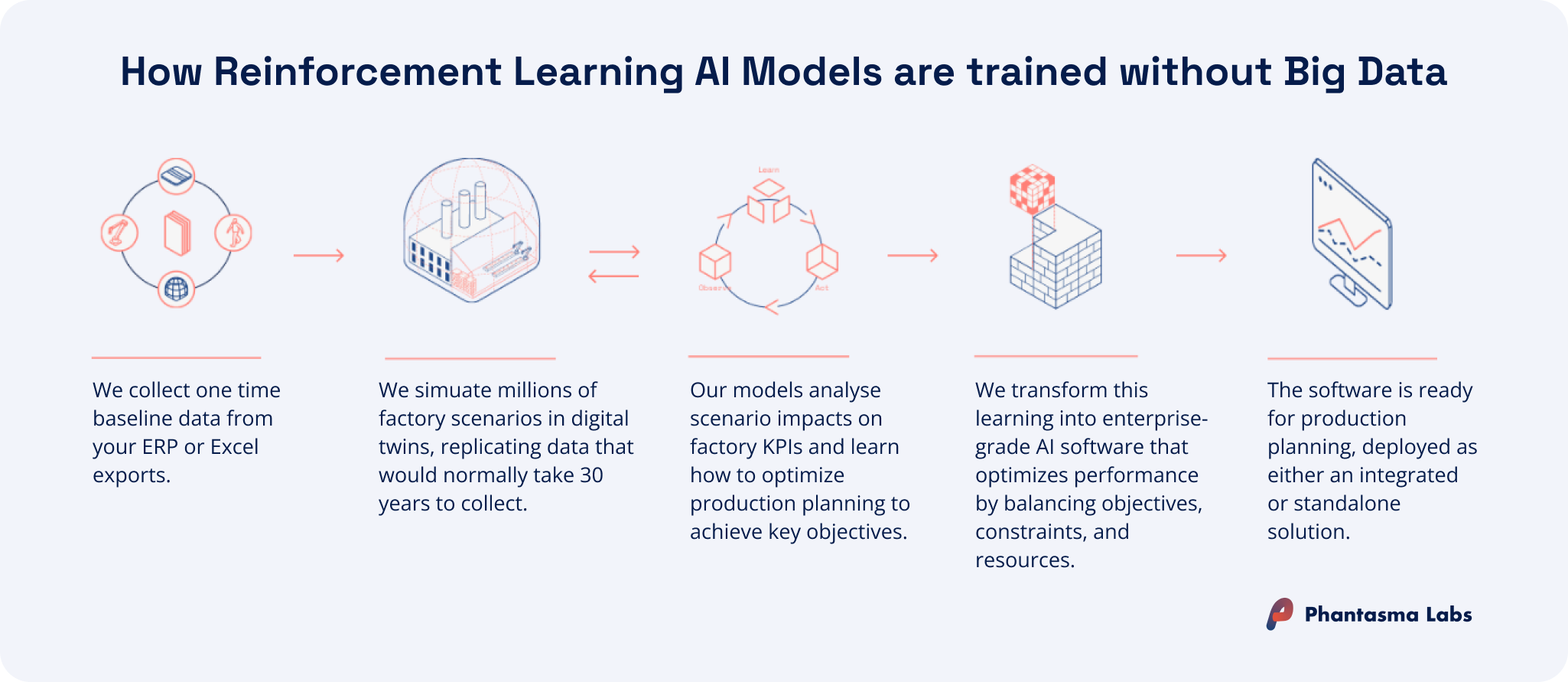
Adaptive AI — specifically reinforcement learning models trained in simulation — works differently. Instead of applying rules that planners define, an RL agent learns a scheduling policy by running millions of production scenarios in a digital model of the factory. The result is a system that handles plan changes dynamically, explores a much larger solution space, and does not require years of historical production data to get started. The article APS vs. AI Scheduling: Which Fits Your Factory? covers the differences in more depth.
Which approach fits your factory depends less on feature lists and more on your planning environment: how dynamic it is, what data you have available, and how quickly you need to go live.
Five Things to Assess Before You Evaluate Any Tool
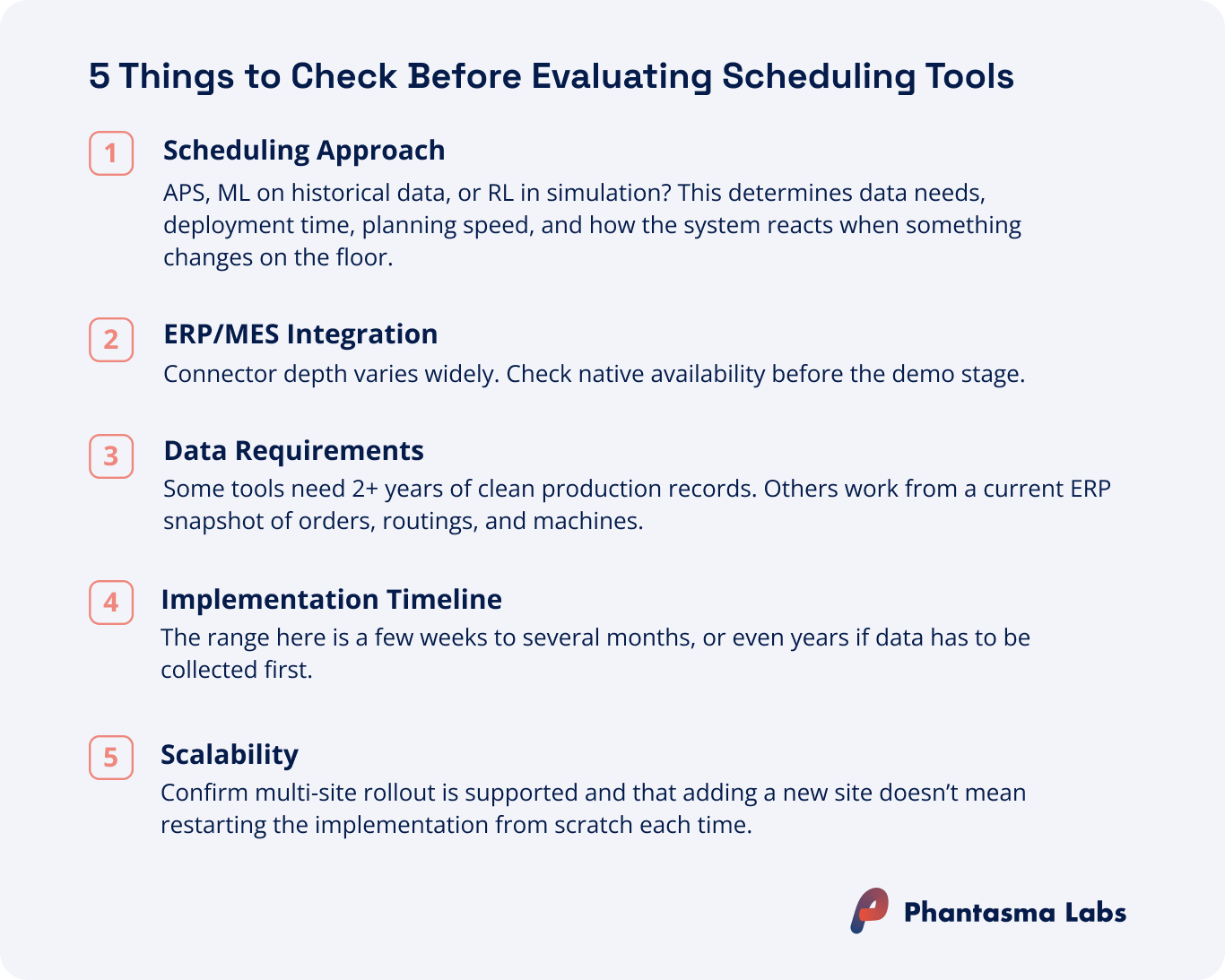
Before shortlisting specific tools, five criteria help structure the evaluation of production scheduling software.
Scheduling approach
Is the tool using mathematical optimization, machine learning on historical data, or reinforcement learning (or a mix)? The answer determines data requirements, deployment timelines, and how the system responds when something changes on the floor. Understanding which type your factory actually needs before starting vendor demos saves significant time. Our guide on AI production scheduling software types walks through the different AI approaches currently used for production scheduling.
ERP and MES integration
Most tools on this list connect with common ERP platforms, but depth of integration varies. Some offer native connectors for SAP, Oracle, or Microsoft Dynamics, while others require custom development.
Data requirements
Some production scheduling tools need two or more years of clean historical production records before they generate a useful schedule. Others work from a current ERP data snapshot: orders, routings, machine calendars, and shift models. Knowing what you can actually provide before the evaluation begins avoids wasting time.
Implementation timeline
Timelines vary from a few weeks to several months, depending on tool complexity and data readiness. If your evaluation includes a pilot phase, deployment speed matters: a faster go-live means a cheaper, lower-risk way to find out whether the tool fits your environment.
Scalability
If you are starting with one line or one site with plans to expand, confirm the tool supports multi-site rollout without requiring a separate product or a new implementation project.
The 7 Most Evaluated Production Scheduling Tools
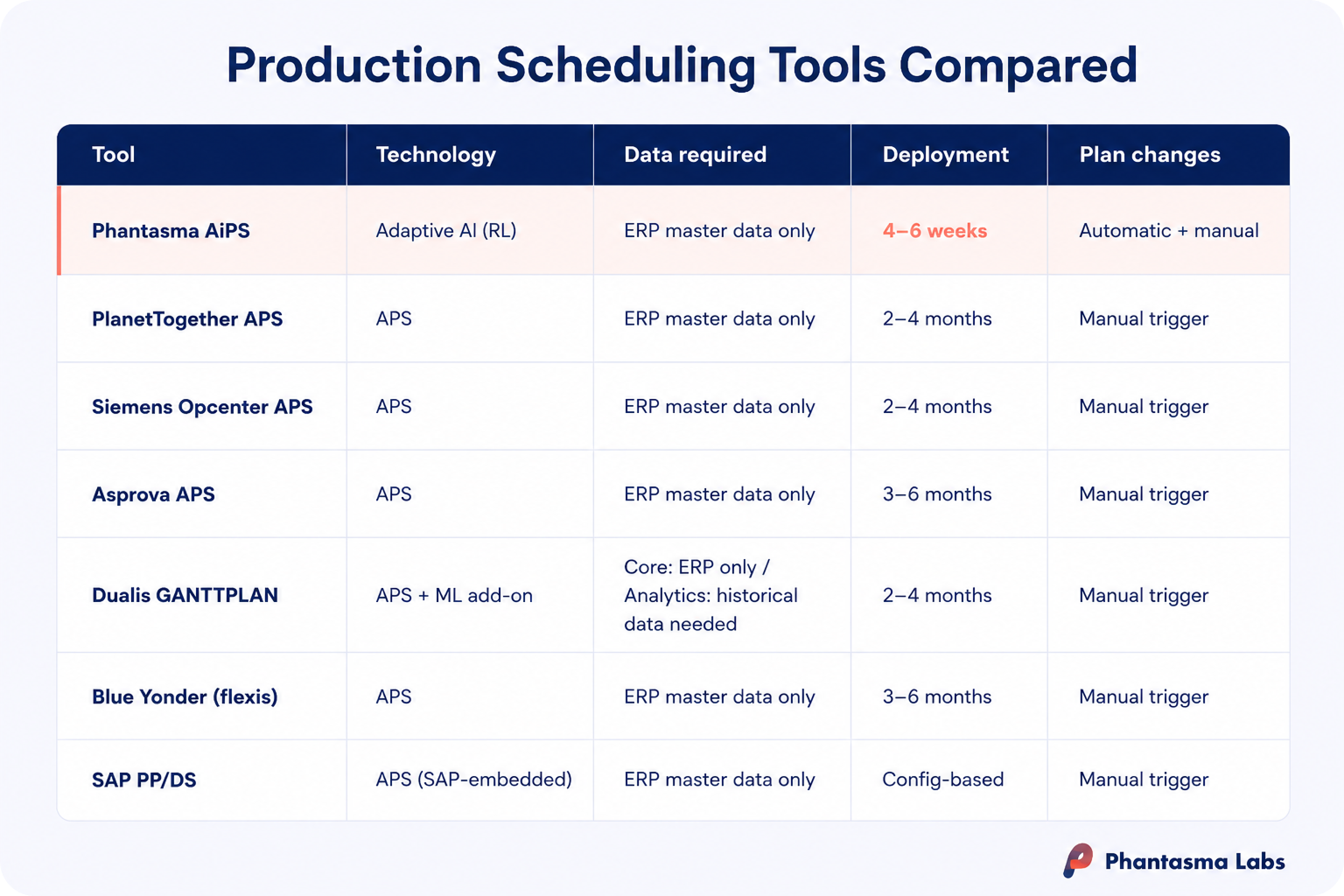
The following profiles cover tools frequently evaluated by discrete and series manufacturers. Each software profile covers five criteria: scheduling approach, ERP and MES integration, data requirements, deployment timeline, and limitations.
1. Phantasma AiPS
AiPS by Phantasma Labs takes a fundamentally different approach from the APS systems in this guide. Rather than encoding planner-defined optimization rules into a finite capacity model, it uses reinforcement learning: the AI trains inside a digital simulation of the factory, running millions of scenarios to develop a scheduling policy it then applies live. Customers select which KPIs to optimize for — setup times, due dates, throughput — and the AI learns how to optimize for them. No rule definition, no parameter configuration, no consultant setup of scheduling logic required. Plans are generated in under five seconds, and plan changes due to rush orders, machine breakdowns, or absent operators are handled without a manual trigger or rule reconfiguration. Deployment takes four to six weeks.
Scheduling approach
Reinforcement learning trained in simulation. Customers define their factory structure and select which KPIs to optimize for; the AI develops a scheduling policy by running millions of simulated scenarios — no planner-defined rules or optimization parameters to configure. Generates optimized plans in under five seconds. Because plan generation is near-instant, planners can produce and compare multiple schedule variants with different KPI priorities before committing — without the manual scenario-modeling work that APS tools require. Supports both event-triggered automatic replanning and planner-initiated manual replanning.
ERP & MES integration
API-based integration with existing ERP and MES systems.
Data requirements
No historical production records needed. Works from current operational data: orders, routings, machine calendars, shift models.
Deployment timeline
4–6 weeks, including ERP/MES integration.
Limitations
Optimized for dynamic production environments with high product mix and frequent plan changes. Manufacturers with highly stable, low-variability schedules may not need this level of adaptability.
If your production environment is dynamic — high mix, frequent changes, competing KPI priorities — adaptive AI scheduling delivers results that constraint-based APS tools aren't built for.
IS YOUR FACTORY READY
Find out if AI scheduling fits your floor
Five questions on your data, systems and processes.
PlanetTogether is a dedicated APS platform for discrete and process manufacturing. Its two standout features are one of the broadest native ERP integration portfolios on this list and scenario-based planning that lets planners build and compare multiple scheduling alternatives before committing to a plan. When a plan needs to change, a planner opens the tool, models the adjustment, evaluates the downstream impact across the full schedule, and accepts a new version. That what-if capability is useful in environments with frequent order priority changes, as consequences are visible before the schedule is locked in. PlanetTogether covers both discrete and process manufacturing, which is a wider scope than most dedicated APS tools.
Scheduling approach
Constraint-based finite capacity optimization. Planners configure scheduling rules, priorities, and parameters — typically with consultant support during initial setup. Supports scenario-based planning: multiple scheduling alternatives can be modeled and compared before committing to a plan.
ERP & MES integration
Native connectors for SAP (ECC, S/4HANA), Oracle, NetSuite, Microsoft Dynamics (AX, NAV, 365), Infor, Epicor, and Kinaxis.
Data requirements
ERP master data: routings, BOMs, work centers, production orders. No historical production records required.
Deployment timeline
Typically 2–4 months depending on ERP integration and configuration scope.
Limitations
Replanning requires a manual trigger when conditions change. Ongoing accuracy depends on planners keeping scheduling parameters and master data current.
When to consider: When you need the broadest ERP integration portfolio and scenario-based planning across discrete and process manufacturing.
3. Siemens Opcenter APS
Siemens Opcenter APS — formerly Preactor, one of the earliest and most widely deployed APS platforms globally — is now part of the Siemens Xcelerator manufacturing portfolio. Its key differentiator from other APS tools on this list is a tiered product architecture: from Opcenter Planning at the entry level through Opcenter Scheduling, with specialized variants such as Opcenter Scheduling SMT for electronics manufacturing. Manufacturers can adopt the level of scheduling depth that matches their actual complexity and scale within the same platform as requirements grow. For manufacturers already running Siemens Opcenter MES, the native integration between scheduling and shop floor execution removes an integration layer that most other APS tools require.
Scheduling approach
Finite capacity scheduling with heuristic and hybrid optimization algorithms. Planner-configured rules and parameters. Tiered product architecture: Opcenter Planning, Opcenter Scheduling, and specialized variants (e.g. Opcenter Scheduling SMT for electronics manufacturing).
ERP & MES integration
Native integration with Siemens Opcenter MES (Execution Discrete). Connects with SAP, Oracle, and other major ERPs.
Data requirements
ERP master data: routings, work centers, resource calendars, production orders. No historical production records required.
Deployment timeline
Typically 2–4 months depending on ERP integration and configuration scope.
Limitations
Implementation complexity and master data maintenance burden are significant at scale.
When to consider: When your factory already runs Siemens Opcenter MES, or when you need a tiered architecture that scales from simple to complex without switching products.
4. Asprova APS
Asprova is a high-speed APS engine developed in Japan, with wide deployment in automotive and electronics manufacturing environments characterized by large numbers of simultaneous constraints: many orders, many machines, many interdependent operations running in parallel. Its core differentiator is raw scheduling speed at scale. Asprova processes complex finite capacity problems faster than most comparable APS systems, which matters in high-volume production where the number of decision variables would introduce latency in other tools. It uses constraint-based mathematical optimization with no machine learning component and requires no historical production records.
Scheduling approach
Constraint-based mathematical optimization. High-speed scheduling engine that processes large numbers of simultaneous orders, machines, and operations faster than most comparable APS systems. No machine learning component.
ERP & MES integration
SAP and a range of ERP systems, particularly those common in Japanese manufacturing. Supports CSV and API-based interfaces.
Data requirements
Clean ERP master data: routings, work centers, resource calendars, production orders. No historical production records needed.
Deployment timeline
Typically 3–6 months depending on ERP integration and configuration scope.
Limitations
Steeper learning curve than most alternatives; dedicated configuration expertise required for implementation and ongoing maintenance. Its strength in structured, high-volume environments is also a constraint in more dynamic contexts.
When to consider: When your environment runs very high volumes with many simultaneous constraints (common in automotive and electronics).
5. Dualis GANTTPLAN
GANTTPLAN by Dualis is an APS system. What separates it structurally from the other APS platforms in this guide is a two-layer architecture: a core finite capacity scheduler and a separately licensed GANTTPLAN Analytics module that applies machine learning to historical production data to improve process time and delivery date forecasting. The two layers have different data requirements and are licensed independently, which means manufacturers can adopt the core APS without committing to the ML add-on, or evaluate both. Planners work through a Gantt-based visual interface with manual drag-and-drop adjustment capability alongside the optimizer.
Scheduling approach
Core: finite capacity optimization with setup-optimized order sequencing. Add-on (GANTTPLAN Analytics): machine learning applied to historical production data to improve process time and delivery date forecasting. The two components are functionally and commercially separate.
ERP & MES integration
SAP (including SAP Business One) and Microsoft Dynamics. Gantt-based visual interface for manual planner interaction.
Data requirements
Core scheduler: current ERP master data (routings, work centers, production orders). GANTTPLAN Analytics add-on: clean historical production records required.
Deployment timeline
Typically 2–4 months depending on ERP integration and configuration scope.
Limitations
The Analytics module requires clean historical records; the core APS does not. Implementation partner network is strongest in the DACH region, which may affect availability elsewhere.
When to consider: When you want the flexibility to start with core finite capacity scheduling and add ML-based process time and delivery date forecasting as a modular upgrade.
6. Blue Yonder (flexis)
Blue Yonder (flexis) is an APS system built specifically for production environments where products are highly configured, sequencing decisions are complex, and coordination across multiple plants is required. Originally developed as flexis AG in Germany, it was acquired by Blue Yonder in 2024 and is now positioned within the broader Blue Yonder supply chain planning platform. Its technical depth is in sequence-dependent setup optimization, complex order configuration constraints, and multi-plant order slotting — capabilities that go beyond what general-purpose APS tools handle well. For manufacturers already in the Blue Yonder ecosystem, the integration with demand management and fulfillment tools is an additional consideration.
Scheduling approach
Constraint-based mathematical optimization, specialized in sequence-dependent setups, complex order configurations, and multi-plant order slotting.
ERP & MES integration
Strong SAP integration. Broader integration with Blue Yonder's supply chain planning and demand management platform.
Data requirements
Structured ERP master data: routings, work centers, capacities, production orders. No historical production records required.
Deployment timeline
Typically 3–6 months depending on ERP integration and configuration scope.
Limitations
Product integration and roadmap are still evolving post-acquisition. Primarily established in automotive and industrial sectors and less widely documented in other discrete manufacturing verticals.
When to consider: When sequencing complexity is high, you have highly configured products and multi-plant coordination.
7. SAP S/4HANA PP/DS
SAP S/4HANA Manufacturing for Planning and Scheduling (PP/DS) is SAP's native production scheduling capability, embedded directly inside S/4HANA rather than offered as a separate application. For manufacturers already running S/4HANA, it is the lowest-friction path to finite capacity scheduling: activation happens through configuration, not a new software implementation, and all master data (routings, work centers, production orders, resource calendars) is shared with the ERP without a synchronization layer. The trade-off is optimization depth: PP/DS delivers solid scheduling capability for moderate complexity environments, but performance trails purpose-built APS or adaptive AI tools as scheduling complexity, plan variability, or multi-KPI requirements increase.
Scheduling approach
Constraint-based optimization with finite capacity logic, embedded natively in SAP S/4HANA. Optimization depth is lower than purpose-built APS tools, particularly for high-complexity scheduling problems.
ERP & MES integration
Natively embedded in SAP S/4HANA. Connects with SAP Digital Manufacturing (MES). All master data shared with the ERP — no separate data synchronization required.
Data requirements
SAP master data already maintained in S/4HANA. No historical production records needed. Data readiness is typically not a separate project.
Deployment timeline
Configuration-based. For manufacturers already on S/4HANA, PP/DS activation does not require a separate implementation project.
Limitations
Only available within SAP S/4HANA — not applicable for manufacturers on other ERP platforms. Optimization depth and plan change handling are lower than purpose-built APS or adaptive AI tools. For environments with high schedule variability, high product mix, or multiple competing KPIs, dedicated scheduling tools typically deliver stronger results.
When to consider: When you are already on S/4HANA and scheduling complexity is moderate.
How to Choose the Right Production Scheduling Tool for Your Factory
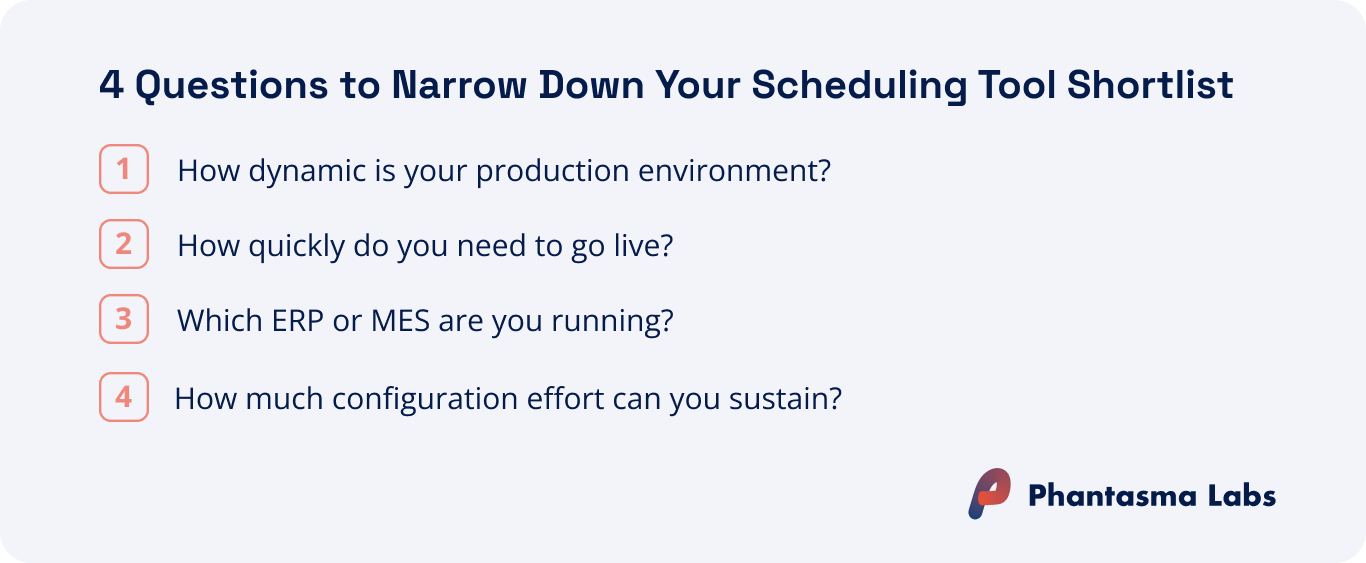
Four questions narrow the shortlist faster than any feature comparison when evaluating production scheduling software.
How dynamic is your production environment?
If your lines are stable, product mix is low, and the schedule rarely needs to change, a well-configured APS system covers most of what you need. If you run high-mix production with rush orders, order reprioritizations, operator absences, or competing KPI priorities, the limitations of mathematical optimization systems become visible faster. In those environments, adaptive AI adds measurably more value.
How quickly do you need to go live?
Deployment timelines across the tools on this list range from four to six weeks to several months, depending on tool type and the configuration work required upfront. If your evaluation includes a pilot phase, or you need to prove ROI before committing to a full rollout, deployment speed is a direct cost factor: a faster go-live means lower pilot risk and an earlier read on whether the tool fits your environment. As a general pattern, tools that require less upfront rule configuration and expert setup tend to deploy faster.
Which ERP or MES are you running?
Most tools on this list connect with the major ERP platforms, but the depth of integration varies. For manufacturers running SAP S/4HANA, PP/DS is a practical starting point that activates within the existing SAP environment. For environments with higher scheduling complexity (high plan change frequency, high product mix, or multiple KPIs), dedicated scheduling tools typically deliver more optimization depth than any ERP-embedded module provides.
How much configuration effort can you handle?
Most APS tools require expert scheduling knowledge to configure: planners or consultants must define the rules, priorities, and parameters the optimizer works from, and maintain them as the production environment changes. Reinforcement learning systems learn their scheduling policy in simulation, without needing planner-defined rules. For any discrete manufacturer evaluating these tools, the configuration question is worth asking explicitly: who builds and maintains the scheduling rules, and what happens when production conditions shift significantly?
Key Takeaways
APS and adaptive AI are structurally different tools. APS applies mathematical optimization to rules planners configure. Adaptive AI trains a scheduling policy in simulation, no rule configuration required. They differ in data needs, deployment timelines, and how they handle disruptions. Knowing which type fits your factory before vendor demos is the decision that shapes every evaluation criterion that follows.
Configuration effort is a total cost of ownership question, not just a deployment question. APS tools require planners or consultants to define and maintain the scheduling rules the optimizer works from. As conditions change, those rules need updating. Reinforcement learning systems learn their policy in simulation, with no rules to manually configure or maintain. This difference compounds over time.
How dynamic your production environment is drives the tool type decision. APS performs well in stable, defined environments where plan variability is low. In high-mix production with frequent changes (rush orders, machine downtime, absent operators) the manual replanning burden accumulates. Adaptive AI handles those disruptions automatically.
Four questions narrow the tool decision: How dynamic is your environment? How fast do you need to go live? Which ERP or MES are you running? How much configuration effort can your team sustain?
FAQs on this Topic
What is the typical implementation timeline for APS and AI scheduling tools?
When does adaptive AI deliver more value than APS for production scheduling?
Do APS and AI scheduling tools all require historical production data?
How do APS and adaptive AI systems handle unplanned schedule changes differently?
Do APS and AI scheduling tools integrate with existing ERP systems?
How much does production scheduling software cost?
Get a monthly wrap up of the latest news and industry trends combined with deep dives and practical guides around industrial AI, production planning and smart manufacturing.
Thanks for subscribing! We’ll keep you up to date with monthly insights on smart manufacturing.
Oops! Something went wrong while submitting the form.