March 24, 2026

Production Scheduling AI vs Automatic Scheduling: What's the Difference?

What they actually do, where each fits, and how to decide for your plant

For most factory teams, "AI scheduling" and "automatic scheduling" sound like they do the same thing. Both promise fewer spreadsheets, less firefighting, and a schedule that doesn't fall apart by mid-morning. But in practice, the difference can mean the gap between a modest efficiency gain and a real step-change in on-time delivery, throughput, and how much time your planners spend reacting versus actually planning. 

This article explains what these two approaches actually mean, where each one fits best, and how to decide what makes sense for your plant.

Why "AI" and "automatic scheduling" get confused in manufacturing

In manufacturing, the word "automation" gets thrown around a lot. A tool can call itself "automatic" just because it generates a schedule without requiring manual drag-and-drop. And right now, almost every vendor labels their product "AI," even when the engine is really just a set of rules or a classic optimizer.

The clearest way to cut through the noise is to focus on how the system makes decisions. Automatic scheduling follows predefined logic: rules, heuristics, or mathematical optimization. AI scheduling uses machine learning to adapt how it makes decisions, and to get better over time, especially when things get unpredictable.

With that distinction in mind, let's look at what each approach actually does.

Infographic comparing automatic scheduling vs AI-driven scheduling in manufacturing: automatic scheduling uses fixed rules and outputs a feasible production schedule, while AI-driven scheduling learns from outcomes and outputs an optimized schedule with options – by Phantasma Labs

What "automatic scheduling" usually means and what it does well

Automatic scheduling software generates a production schedule from your constraints: machines, routings, setup times, calendars, due dates. In practice, most "automatic" schedulers are implementations of Advanced Planning and Scheduling (APS) concepts, typically running in finite capacity mode, meaning they respect real capacity limits rather than assuming infinite capacity.

The engines behind automatic scheduling

Most automatic schedulers use one of these approaches (or a mix):

  • Dispatching rules: The system sequences work using rules like FIFO, earliest due date, or shortest processing time. Fast and simple.
  • Heuristics and meta-heuristics: "Good-enough" search methods that find decent schedules quickly when the number of possibilities is huge.
  • Mathematical optimization (e.g., mixed-integer programming): Powerful, but can get slow as the problem scales up.
  • Finite capacity scheduling: Explicitly accounts for real capacity limits and shift calendars.
Infographic showing the four engines behind automatic scheduling: dispatching rules, heuristics, mathematical optimization, and finite capacity scheduling – each with a description and trade-off – by Phantasma Labs Infographic showing the four engines behind AI scheduling in manufacturing: reinforcement learning, digital twin simulation, multi-KPI optimization, and continuous replanning – by Phantasma Labs

In practice, the best AI scheduling tools work as an AI co-pilot: they propose schedules, show you the trade-offs between different KPI priorities, and help your planners replan fast, while keeping humans in control of final decisions.

The real differences that show up on the shop floor

Forget the UI. The biggest differences between automatic scheduling and AI scheduling typically show up in five areas.

1. Optimization vs. rule execution

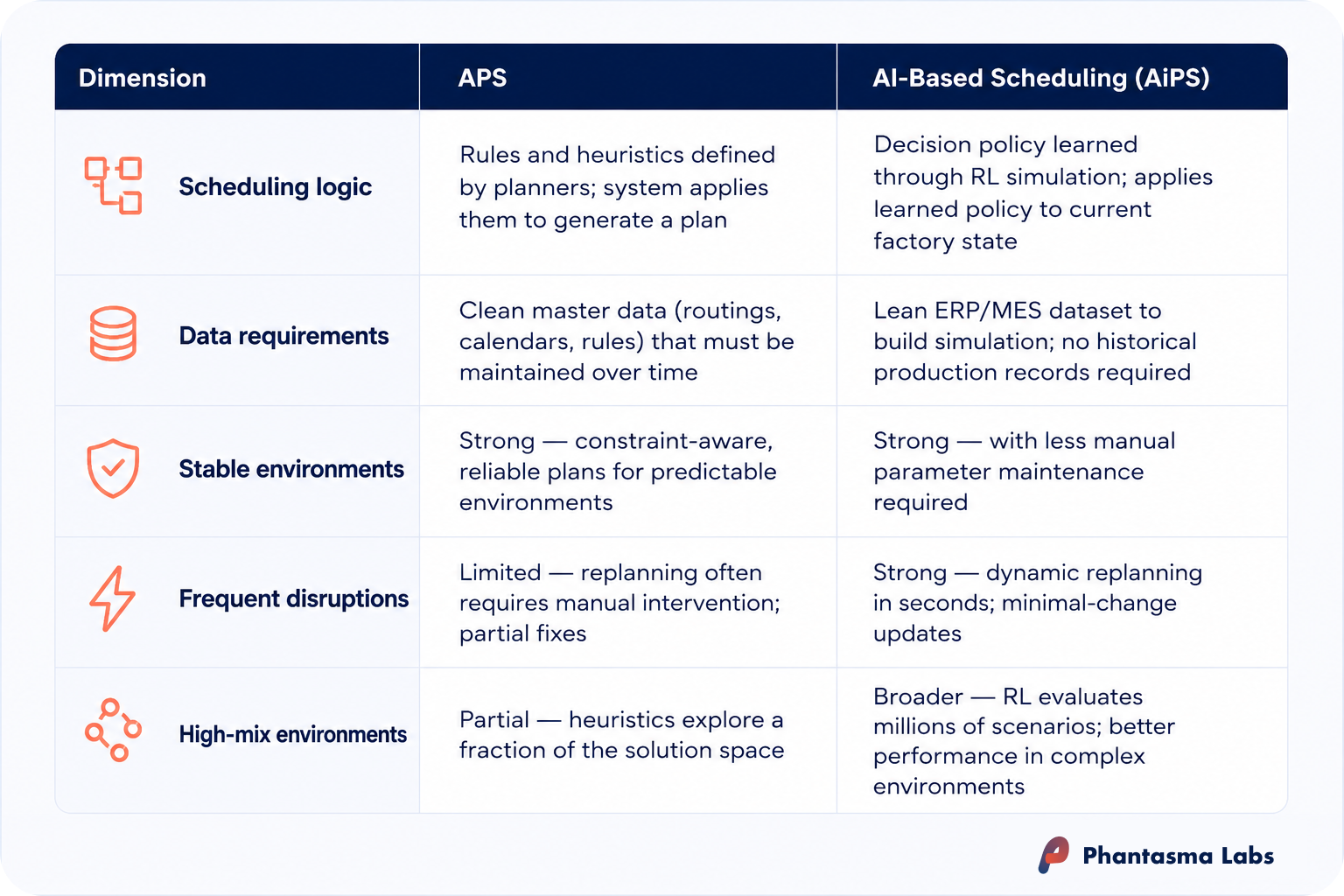
Automatic scheduling executes logic: apply constraints, apply priority rules, output a feasible schedule. AI scheduling learns a policy that produces better schedules across many different scenarios, not just one snapshot. This is why AI scheduling tends to shine when priorities conflict.

2. Performance under disruption

In a stable environment, both approaches can look identical. But when a machine goes down at 10:20, a rush order arrives at 11:05, and a key operator calls in sick for the night shift, the scheduling problem gets dynamic fast.

AI scheduling is typically designed for exactly this: fast replanning that minimizes damage to your KPIs without turning the whole schedule upside down.

3. Learning plant-specific behavior

A rule set is only as good as the assumptions baked into it. If your real bottleneck behavior depends on product families, operator skills, or setup sequences that shift with your demand mix, fixed rules can go stale. AI scheduling tools can be trained (on historical data, simulation, or both) to internalize these patterns and improve as your operations evolve.

4. Scenario exploration at speed

Planners don't usually need a schedule, they need options. "If we protect Customer A's due date, what happens to setup time?" "If we run Product Family X as a campaign, what does that do to WIP and lateness?" An AI co-pilot approach is built for rapid scenario generation and side-by-side KPI comparison.

5. Data dependency and the "big data" myth

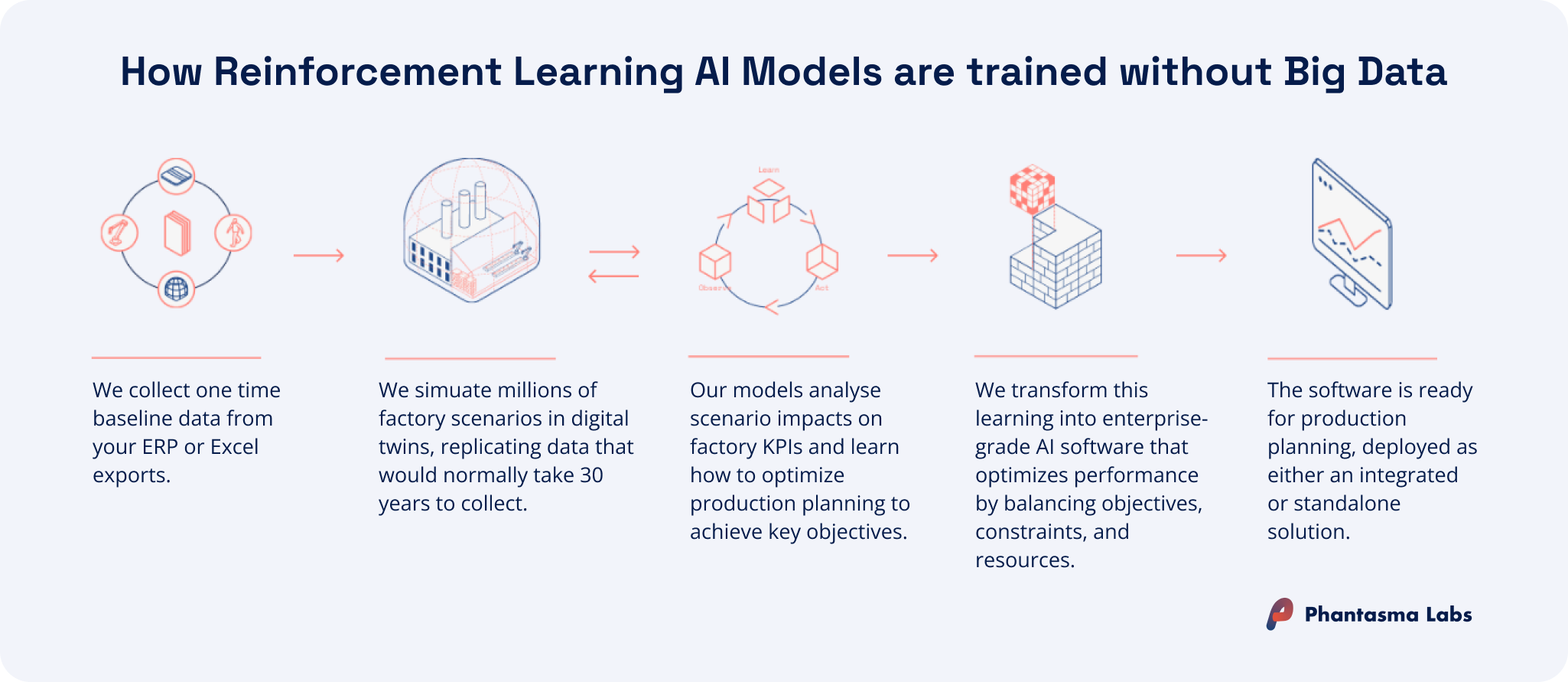
Some AI approaches need large historical datasets. Others, especially simulation-trained reinforcement learning, can start from a lean operational dataset (orders, routings, capacities, calendars) and learn in a simulated environment. That matters for mid-size factories that don't have years of clean data sitting around.

Comparison table of automatic scheduling vs AI-driven scheduling across seven dimensions: primary goal, upfront effort, data needed, handling disruptions, KPI trade-offs, adoption timeline, and integration – by Phantasma Labs

The short version: automatic scheduling works well when the problem is stable and well-defined. AI scheduling delivers additional value even in moderately complex environments — faster planning, better trade-off visibility, and less replanning effort — and becomes especially compelling when variability and conflicting KPIs are a daily reality.

When automatic scheduling is better, or sufficient

Automatic scheduling can be the right choice when your factory is relatively stable, your constraints are well understood, and the cost of suboptimal decisions is manageable. In these environments, a well-implemented rule or APS approach delivers most of the value, without the added complexity of AI training or continuous learning.

Typical environments where it works well

Consider prioritizing automatic scheduling when most of these apply:

  • Low-mix, repetitive production with stable routings and long runs.
  • Few sequence-dependent setups, or the setup logic is simple and consistent.
  • Disruptions are rare, or are handled outside scheduling with buffers and standard work.
  • A single KPI drives most decisions (e.g., maximize throughput on one bottleneck line).
  • Planning horizon is short and stable, so frequent replanning isn't required.

Practical examples

  • Packaging lines with long campaigns and predictable changeovers.
  • High-volume machining where the sequence is largely fixed and the main issue is capacity leveling.
  • Simple make-to-stock environments where service is protected by finished goods inventory.

In these cases, the biggest gains come from enforcing finite capacity discipline, eliminating spreadsheet errors, and standardizing dispatch logic. Once that foundation is in place, you can always layer in AI scheduling later as your planning complexity or ambitions grow.

Infographic comparing when to use automatic scheduling vs AI-driven scheduling in manufacturing, listing ideal use cases for each based on production complexity, disruption frequency, KPI count, and planning horizon – by Phantasma Labs

When AI scheduling makes a real difference

AI scheduling tends to deliver the most visible gains when planning is structurally complex, but even in moderately dynamic environments, the speed and quality of planning decisions improves noticeably.

High-impact environments

You'll usually see the biggest gains when several of these apply:

  • High-mix or mid-mix manufacturing where the combinations explode: job shops, complex discrete manufacturing, configure-to-order.
  • Frequent disruptions: machine downtime, missing materials, rush orders, labor variability.
  • Sequence-dependent setups that dominate capacity: paint lines, injection molding color changes, heat treatment recipes, SMT changeovers.
  • Alternative routings or parallel machines where the "best" assignment changes daily.
  • Multiple conflicting KPIs: on-time delivery, changeover time, utilization, WIP caps, overtime, energy constraints.
  • Need for scenario planning: "What if we add a weekend shift?" "What if that bottleneck is down for 12 hours?"

Why AI helps here 

In these environments, an AI co-pilot can evaluate far more feasible sequences than any planning team can, and it can do it multiple times throughout the day. Instead of one "best guess," you get several KPI-optimized scenarios with clear trade-offs laid out. That's where scheduling stops being about generating a feasible plan and starts being about making consistently better decisions, day after day.

How to decide: a step-by-step checklist

Choosing between the two approaches isn't a philosophical debate, it's an operations decision. What level of complexity do you actually have, and what level of decision quality do you need?

Step 1: Classify your scheduling reality 

Start by being honest about what your shop floor actually looks like day-to-day — not on a good week, on a normal one.

  • Mostly stable → Automatic scheduling is a solid foundation. AI scheduling can still add value here by speeding up planning and improving trade-off visibility, but the urgency is lower.
  • Somewhat volatile → This is where AI scheduling starts to clearly pull ahead due to faster replanning, better handling of conflicting priorities, less manual effort.
  • Highly dynamic → Rule-based approaches will keep hitting their limits here. An AI scheduling co-pilot is the clear fit.

Step 2: Define success in KPIs, not features 

Whatever direction Step 1 pointed you toward, write down your top 1–4 scheduling KPIs before you talk to any vendor. Not capabilities you want, but outcomes you'll actually measure, with a baseline you can compare against after a pilot.

Good candidates are on-time delivery / OTIF, total setup and changeover time, throughput on your bottleneck, planner hours spent on daily replanning, overtime and expediting costs.

This step also protects you: if a vendor can't show you improvement on your specific KPIs in a pilot, that's your answer.

Four-step decision guide for choosing between AI-driven and automatic scheduling: classify your scheduling reality, define KPI-based success criteria, check minimum viable data requirements, and run a pilot – by Phantasma Labs

Step 3: Check your minimum viable data

You almost certainly have enough to start. Both approaches need the same operational foundation, and it's usually already sitting in your ERP or MES:

  • Orders: quantities, due dates, priorities
  • Routings: operations, setup and run times, allowed machines
  • Resource calendars: shifts, maintenance windows, holidays
  • Basic constraints: sequence rules, time fences, WIP limits

If you have these four, you can start. Data quality matters more than data volume — a clean week of actuals beats two years of messy history.

Step 4: Pilot the right way and read the result

Run in parallel first. Take one line, one product family, or one bottleneck cell and let the system generate a schedule alongside your current plan. Measure weekly against your Step 2 KPIs.

After 4–6 weeks, the pilot gives you one of two clear answers:

  • The system is closing the gap on your KPIs → you have the right tool. Expand scope, tighten the rules, build the workflow.
  • The gap isn't closing → either the data isn't clean enough yet, the constraints aren't modeled correctly, or you genuinely need a different approach. Both are useful findings before a full rollout.

Adoption, integration, and what to realistically expect

The best scheduling technology fails if adoption is painful. The practical goal is to enhance your existing ERP/MES and planning boards, not replace them overnight.

Integration patterns that work

Most AI and automatic scheduling tools integrate the same way:

  • Read orders, routings, WIP, and calendars from ERP/MES (via API or export).
  • Generate schedules and scenarios in the scheduling engine.
  • Write back the approved plan (start times, sequences, allocations) to the planning board, ERP, or MES.

This is also where an AI co-pilot approach eases change management: planners keep ownership of final decisions, while the system speeds up the number-crunching and scenario comparison.

Diagram showing how an AI-powered Advanced Planning and Scheduling (APS) system integrates with ERP and MES layers in a manufacturing environment, exchanging production data and production plans across corporate and operational levels – by Phantasma Labs

Where projects succeed, and where they stall

Most scheduling projects, AI or not, come down to three things:

  • Master data credibility: setup/run times, calendars, and routings that actually reflect reality.
  • Clear planning rules: what is frozen, what can move, what must never be violated.
  • Cross-functional alignment: sales priorities, production constraints, and maintenance windows all pulling in the same direction.

Get those right, and both approaches can deliver value quickly. Skip them, and even the best AI tool will be fighting bad inputs.

The simplest way to choose

If your environment is truly stable and your constraints rarely change, automatic scheduling gives you most of what you need. But for most factories, even those that aren't highly dynamic, AI scheduling adds real value beyond just handling disruption: faster planning cycles, less manual effort, and better visibility into trade-offs from day one.

The most pragmatic approach isn't 'AI everywhere'. It's starting where decision complexity or planning effort is highest, and expanding from there.

Key Takeaways

  • Automatic scheduling usually means rule-based, heuristic, or APS-style scheduling that executes predefined logic to generate feasible plans.
  • AI scheduling focuses on decision quality under complexity, learning or adapting policies (often with simulation/digital twins) to optimize KPIs across disruptions, and to speed up planning cycles.
  • Automatic scheduling is often sufficient in stable, low-mix environments with simple setups and few daily changes.
  • AI scheduling tends to deliver the biggest gains in high-mix, disruption-heavy plants with conflicting KPIs, but also speeds up planning and reduces manual effort in more moderate environments.
  • Don't choose by features, choose by measurable outcomes: define KPIs, baseline performance, and run a controlled pilot before scaling.
  • Integration is rarely the differentiator: both approaches typically sit on top of ERP/MES via APIs or exports. Adoption succeeds when master data and planning rules are credible.

FAQs on this Topic

What is the difference between AI scheduling and automatic scheduling?
When is automatic scheduling the right choice?
What types of factories benefit most from AI scheduling?
What is reinforcement learning and how is it used in production scheduling?
What does production scheduling AI do?
Can I start with automatic scheduling and switch to AI later?
What data is needed to use AI for production scheduling?
Which KPIs best capture the impact of production scheduling AI?

Subscribe To Our
// Industrial AI Insider
Newsletter

Want to stay up to date about how AI is transforming the manufacturing industry?

Subscribe to our newsletter for a monthly wrap up of the latest news and industry trends combined with deep dives and practical guides around AI, production planning and smart manufacturing.