When factory teams evaluate AI scheduling software, the first practical question is usually: "How does this connect to our ERP?". It's the right question. The gap between a compelling demo and a system running in your factory almost always comes down to integration — not to the AI itself.
Most of the data a production scheduling AI needs already sits in your ERP. The connection is typically simpler than teams expect. What takes time is making sure the data fed into the system is clean and complete. This article walks through what the AI needs, how the connection is made, and what a typical deployment looks like.
Why Integration (Not The AI) is Where Projects Stall
A lot of conversations about AI scheduling focus on the algorithm: what kind of AI is it, how does it learn, what can it optimize? These are reasonable questions. But they're rarely where implementations run into trouble.
According to Deloitte's 2026 Manufacturing Industry Outlook, 78% of manufacturers automate less than half of their critical data transfers. In practice, that means AI recommendations, no matter how good the model, often die in a copy-paste handoff. The schedule gets generated but never makes it back into the systems planners work in, so nothing changes on the floor.
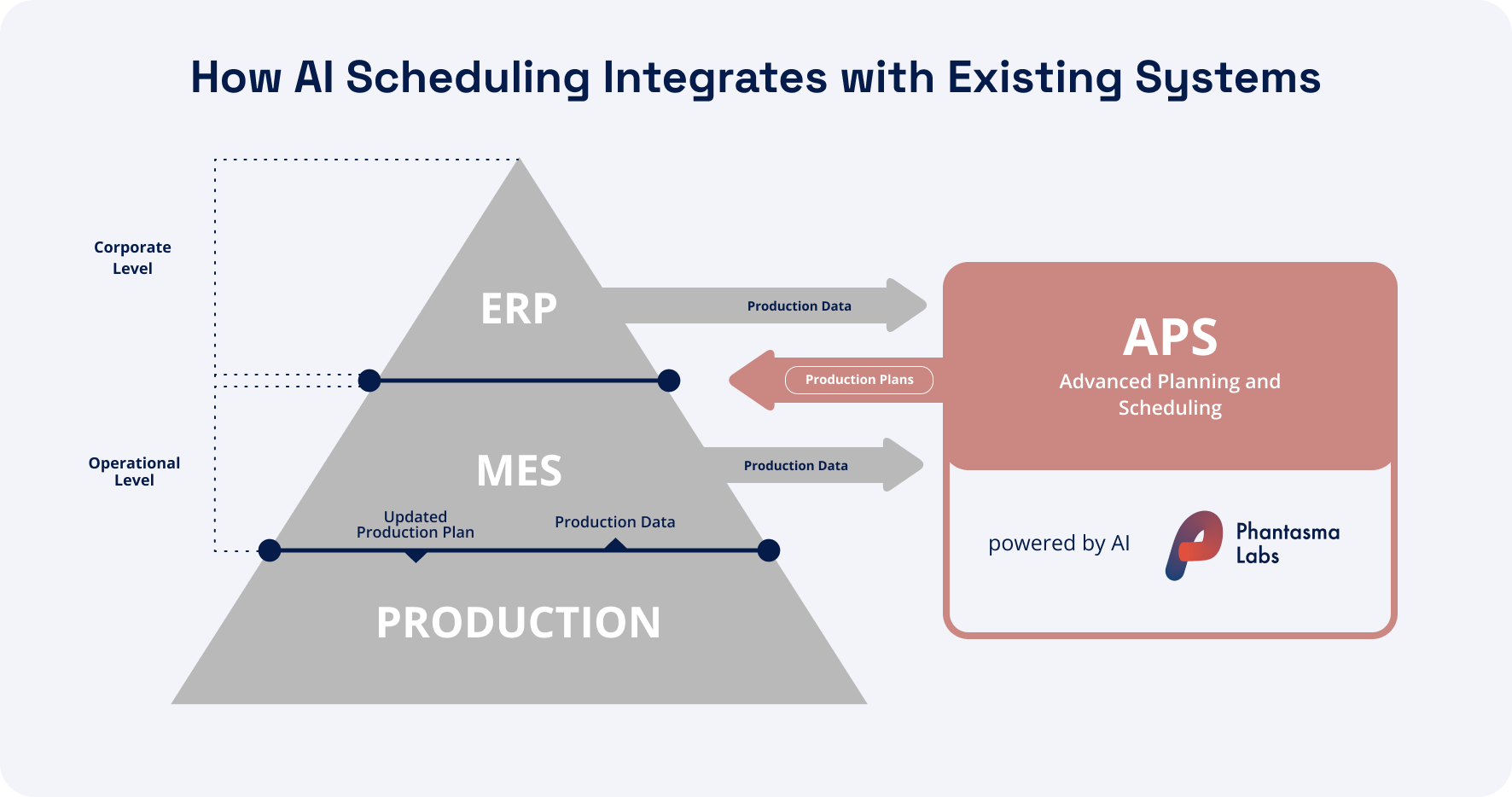
Production scheduling AI ERP integration solves this by creating a live, bidirectional link between the AI scheduling tool and the ERP. Orders, routings, and capacity data flow in. Optimized planned sequences flow back out. But getting that link set up cleanly requires attention to a few specific areas, starting with what data the AI actually needs.
What Data a Production Scheduling AI Actually Needs From Your ERP
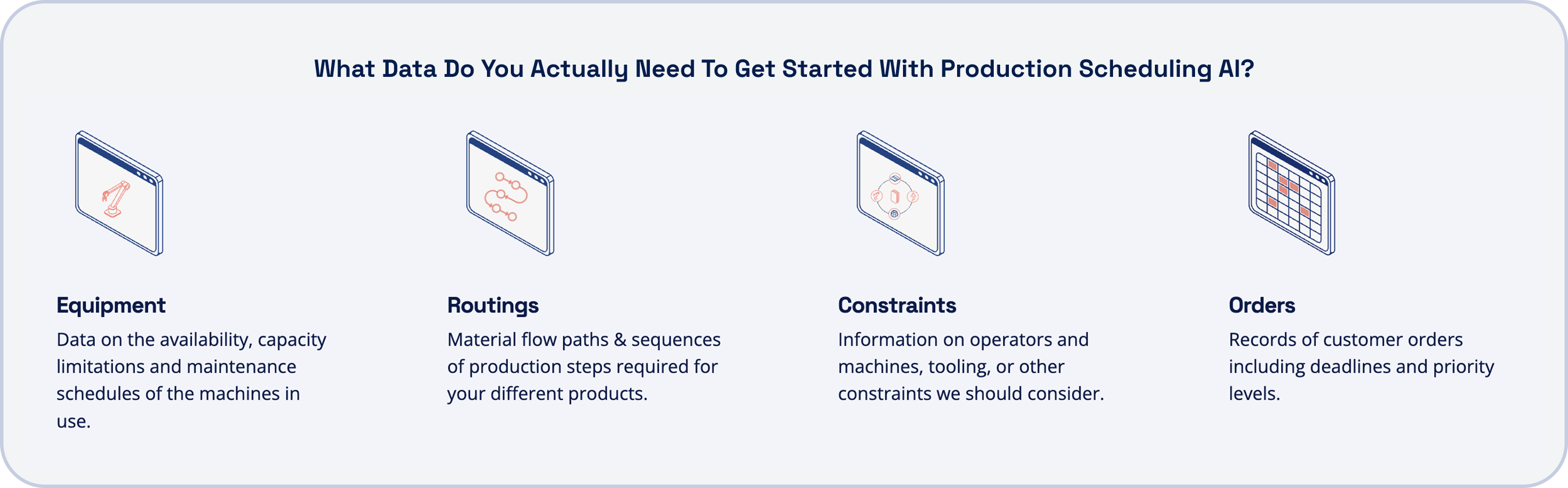
The good news for most factories: the minimum viable dataset for production scheduling AI ERP integration is already in the ERP. The production scheduling data requirements are straightforward. Four categories of data the AI needs to generate a useful schedule:
Production orders: quantities, due dates, priorities, and customer-level urgency flags
Routings: which operations are required, in what sequence, on which machines or work centers, and how long each setup and run step takes
Constraints: sequence rules, freeze windows, WIP limits, and hard rules about what can and cannot run together
The four inputs listed above are what any production scheduling AI needs to generate a schedule. Where approaches differ significantly is in what's required before the AI can start making good decisions.
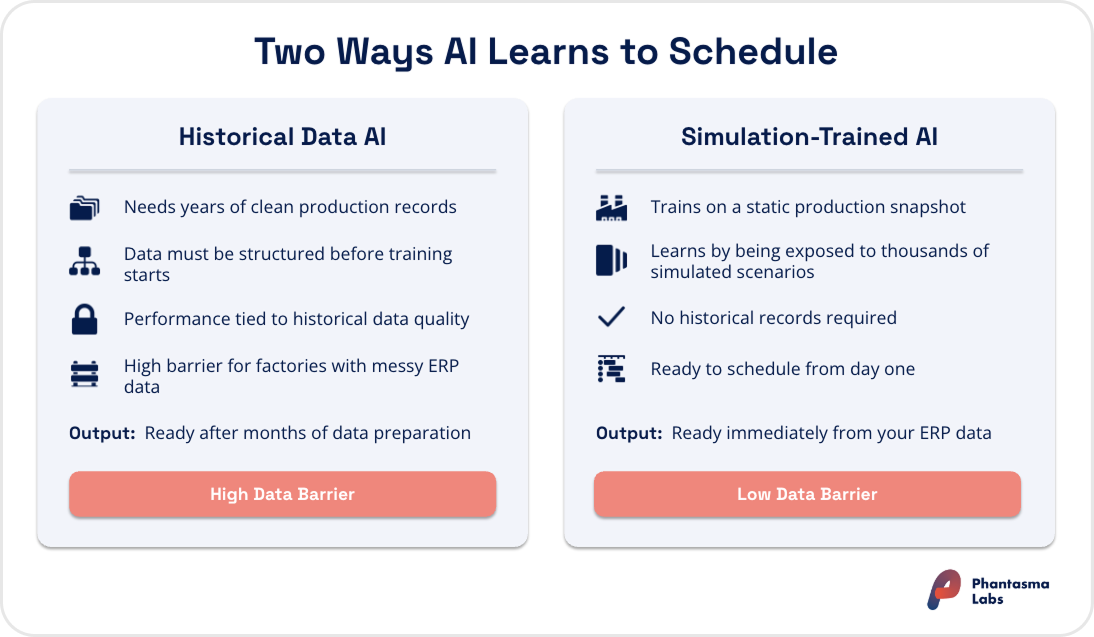
Most AI scheduling tools learn from historical production data, meaning they need years of structured, clean factory records to train on before they can perform reliably. For many factories, especially those with messy or incomplete ERP data, this is a real barrier to getting started.
Simulation-trained approaches work differently. Instead of learning from past runs, the AI is trained in a simulated factory environment — exposed to thousands of scenarios based on your static production setup (machines, routings, capacities, products) — before it ever touches your live operations. This means no historical data requirement and no waiting period: the AI arrives ready to schedule from day one, based on a snapshot of how your factory actually works today.
One important distinction: data quality matters more than data volume. A clean, current week of operational data is more useful than two years of records with missing values, outdated routing times, or work centers that no longer exist. The AI needs an accurate model of your current factory, but no archive of how it ran in the past.
Do You Need an MES to Connect a Production Scheduling AI?
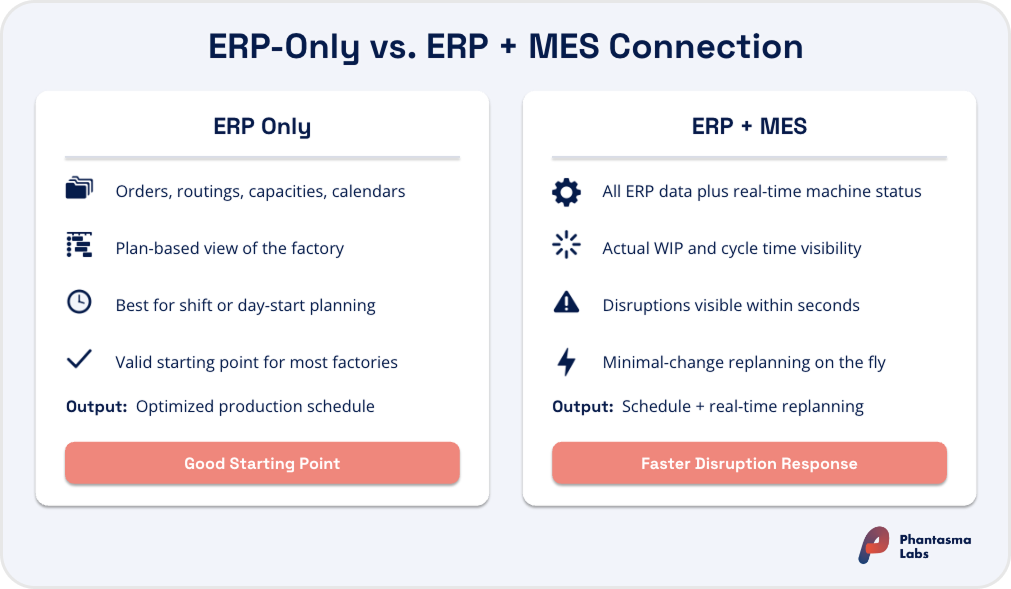
Not necessarily. An ERP-only connection is a valid and common starting point. Many factories connect AI scheduling directly to their ERP and run it effectively from there. Production scheduling AI MES integration becomes relevant depending on how fast you need to respond when things go wrong, not whether the connection can work at all.
What a manufacturing execution system (MES) adds is real-time shop floor feedback. Where an ERP typically holds the plan, an MES tracks execution: which machines are running, which jobs are in progress, how actual cycle times compare to planned times, and what the current WIP picture looks like. When this data feeds into the AI scheduling tool, it enables faster and more accurate replanning after disruptions.
If a machine goes down at 9am, an AI connected only to the ERP will work from the last-known planned state. An AI connected to both ERP and MES will see the actual machine status in near real time and can generate a revised plan within seconds. The difference matters most in environments where disruptions are frequent and replanning speed directly affects on-time delivery.
The practical question is not "do we need an MES?" but "how fast do we need to respond when things change?" If the answer is within minutes, production scheduling AI MES integration adds meaningful value. If the primary goal is better planning at the start of each shift or week, ERP-only integration is a reasonable place to begin; MES can always be added later as the use case matures.
IS YOUR FACTORY READY
Find out if AI scheduling fits your floor
Five questions on your data, systems and processes.
There are three common approaches to production scheduling AI ERP integration, and the right one depends on your existing systems and IT environment.
Pre-built API connector
Most AI scheduling vendors offer ready-made connectors for common ERP platforms. These are the fastest to set up and require the least internal IT effort. The vendor handles configuration; the factory IT team provisions data access and validates the output. For standard deployments against widely-used ERP systems, this is how it's typically done.
Middleware or iPaaS layer
For factories with more complex system landscapes: multiple ERP instances, a WMS that also needs to exchange data with the scheduler, or an ERP without a pre-built connector, a middleware platform acts as the AI scheduling integration layer. This adds some setup time but gives more flexibility for custom data flows and transformation logic between systems.
Native ERP embedding
A deeper option is building the AI scheduling engine directly into the ERP's planning interface, so planners work with AI-optimized schedules without leaving the ERP environment they already use. This requires close collaboration between the scheduling AI vendor and the ERP provider.
A deeper integration in practice: Phantasma's partnership with ERP provider Vectotax is a live example of native ERP embedding: the AI scheduling engine is built directly into the Vectotax planning board, so planners get AI-optimized schedules without switching tools.
In the majority of standard deployments, the technical side of the integration is handled by the AI scheduling vendor. The internal effort is mainly around provisioning data access and validating that the output matches what the planning team expects.
What Flows Into The AI And What Comes Back
ERP MES data exchange for AI scheduling runs in both directions. Understanding this flow is useful for anyone assessing whether it will work with an existing system setup or what internal approvals may be needed.
Into the AI scheduling tool
Production orders (from ERP)
Routings and operations (from ERP)
Machine and work center capacities (from ERP)
Shift calendars and planned maintenance (from ERP)
Real-time machine status and WIP (from MES, when connected)
Out of the AI scheduling tool, back to ERP/MES
Planned sequences: which jobs run in what order, on which resources
Scheduled start and finish times for each operation
Capacity commitments: which resources are allocated and when
The AI scheduling tool operates as a scheduling layer on top of existing systems. It doesn't store source data, manage orders, or track production execution, ERP and MES continue doing those jobs. The AI takes a snapshot of the current state and generates an optimized plan. When something changes — a rush order arrives, a machine breaks down — it pulls a fresh snapshot and makes the minimal adjustments needed to accommodate the new situation, keeping the rest of the plan intact to avoid disrupting work already in progress.
This ERP MES data exchange for AI scheduling is what enables planners to see multiple KPI-optimized scenarios rather than a single best guess, and to respond to disruptions in minutes rather than hours.
The Real Integration Challenge: Master Data Quality
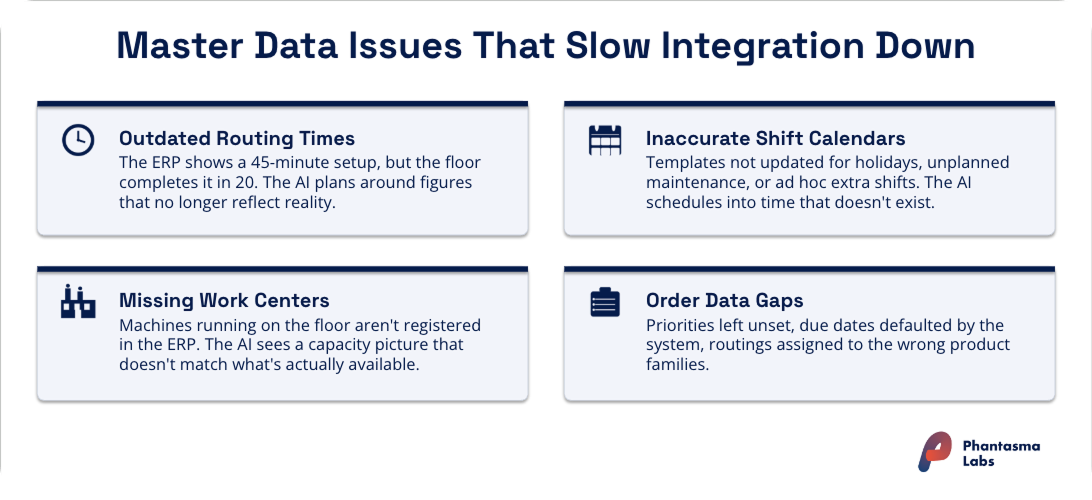
This is where most production scheduling AI ERP integration projects hit friction, and it's almost never the connector technology that causes it. The typical culprits are data hygiene issues that exist in most ERP systems and stay invisible until something tries to use the data programmatically:
Routing times that haven't been updated in years. The ERP says a setup takes 45 minutes; the shop floor has been completing it in 20 for the past two years. The AI plans around the wrong time.
Work centers defined in the ERP that no longer exist, or machines on the floor that aren't registered. The capacity picture the AI sees doesn't match reality.
Shift calendars that reflect a template, not current practice. Public holidays missing, maintenance windows not recorded, ad hoc extra shifts never logged.
Order data inconsistencies. Priorities not set, due dates left as system defaults, routings assigned to the wrong product families.
None of these are technology problems. They're data issues that require a production supervisor and a planner to sit down and reconcile the ERP against actual floor conditions. Master data synchronization between ERP and MES (keeping routings, work centers, and BOMs aligned) is widely recognized as one of the most persistent challenges in manufacturing IT, and it shows up clearly at the start of every AI scheduling integration.
The practical implication: run a data audit before starting. Check routing times against recent floor performance. Walk through the work center list with a production supervisor. Confirm shift calendar entries match real patterns, including exceptions. Fixing this upfront shortens the validation phase significantly and determines how quickly the first AI-generated schedules become trustworthy.
What The Integration Process Typically Looks Like
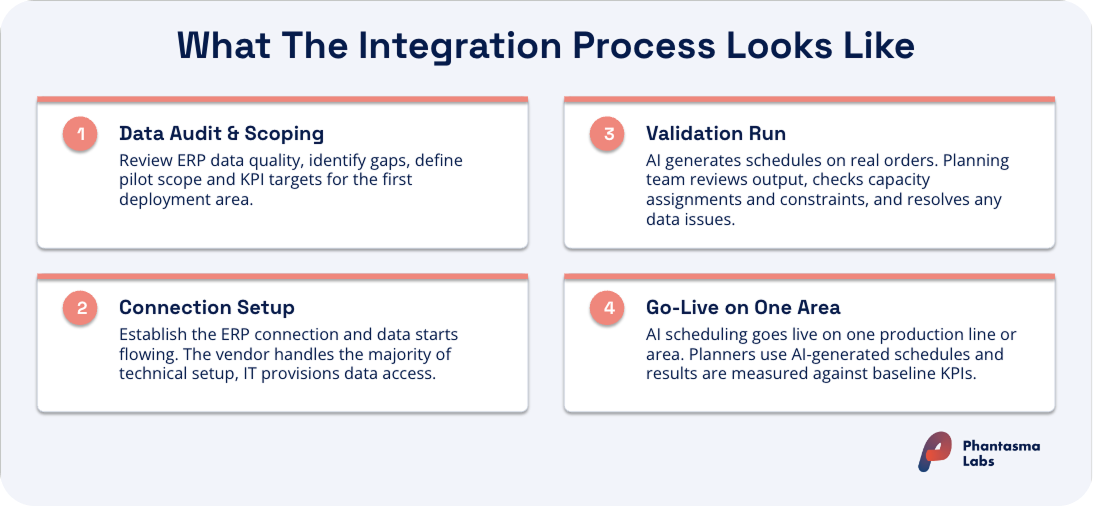
Most standard production scheduling AI ERP integration projects run in four phases:
Phase 1: Data audit and scoping
The AI scheduling vendor reviews what's available in the ERP, identifies data quality gaps, and defines which production orders and areas will be included in the first deployment. This is also when KPI targets are defined: on-time delivery, throughput, setup time reduction, or a combination.
Phase 2: Extraction setup and connector configuration
The technical connection between the ERP and the AI scheduling tool is established. Data starts flowing into the tool. The vendor's implementation team handles the majority of this; internal IT coordinates access provisioning.
Phase 3: Validation run
The AI generates schedules on a subset of real orders. The planning team reviews the output: does the sequence make sense? Are capacity assignments correct? Does the plan respect the constraints that matter? Data quality issues that weren't caught in the audit tend to surface here and get corrected before go-live.
Phase 4: Go-live on one production area
The AI scheduling tool goes live for one production line or area. Planners use the AI-generated schedule as part of their regular workflow, and results are measured against the Phase 1 baseline KPIs.
The typical timeline for a standard deployment is 4–6 weeks from initial scoping to go-live on the first production area. More complex environments (multiple ERP instances, non-standard data models, multi-site scope) take longer. Starting with one line and expanding is almost always faster and lower-risk than attempting a facility-wide rollout from the outset.
Connecting Production Scheduling AI to Your ERP: Where to Start
Connecting a production scheduling AI to your ERP is not a multi-year IT project. The minimum viable connection is built on data your factory already has. The technical integration is typically handled by the vendor. What makes the difference is clean master data, a clearly defined starting scope, and a planning team that reviews the first AI-generated schedules carefully and validates the output against reality.
The question worth asking before starting is not "can our ERP support AI scheduling integration?" (it almost certainly can), but "how accurate is the data actually in there?" That audit, done before the integration starts, is what determines how quickly the AI's first schedules become useful and trusted by the planning team.
Key Takeaways
The minimum viable data is already in your ERP. Orders, routings, resource calendars, and constraints are standard ERP data. The production scheduling data requirements don't demand specialist infrastructure or years of historical records.
MES is beneficial, but not a prerequisite. ERP-only integration is a valid starting point. Production scheduling AI MES integration adds real-time shop floor feedback that enables faster replanning; add it when replanning speed is a priority.
The AI is a scheduling layer, not a replacement. It reads from ERP and MES, generates optimized plans, and writes results back. Both systems continue doing their jobs.
Master data quality is the real bottleneck. Outdated routing times, missing work centers, and inaccurate calendars are what slow integration down — not the connector technology. Fix this first.
Data accuracy matters more than data volume. A clean, current dataset beats a large, messy one for AI scheduling integration.
Standard deployments take 4–6 weeks. Starting with one production area and expanding is faster and lower-risk than a facility-wide rollout.
FAQs on this Topic
What data is needed to use AI for production scheduling?
How does AI scheduling integrate with my existing ERP/MES and planning board?
Do I need to replace my ERP or MES to use AI scheduling?
Do I need an MES to use a production scheduling AI?
What's the biggest challenge when integrating AI scheduling with an ERP?
How long does it take to integrate a production scheduling AI with an ERP?
Get a monthly wrap up of the latest news and industry trends combined with deep dives and practical guides around industrial AI, production planning and smart manufacturing.
Thanks for subscribing! We’ll keep you up to date with monthly insights on smart manufacturing.
Oops! Something went wrong while submitting the form.